
Appearance
Chart of Accounts
A Chart of Accounts (COA) in Upscale ERP is a structured listing of all the accounts used by an organization to record and report financial transactions. It serves as the backbone of the organization's financial record-keeping system, providing a framework for organizing financial data.
The accounts are typically classified into five main categories: Assets, Liabilities, Equity, income, expense
Assets
- other assets
- Other Current Assets
- Cash
- Accounts Receivable(AR)
- Bank
- Payment clearing
- Fixed Assets
- Stock
Liability
- Accounts Payable(AP)
- Other Current Liabilities
- Credit Card
- Long Term Liabilities
- Other Liabilities
Equity
- Equity
Income
- Income
- Other Income
Expense
- Expense
- Cost of Goods Sold
- Other Expenses
Creating a new Chart of Accounts
To create a new account,
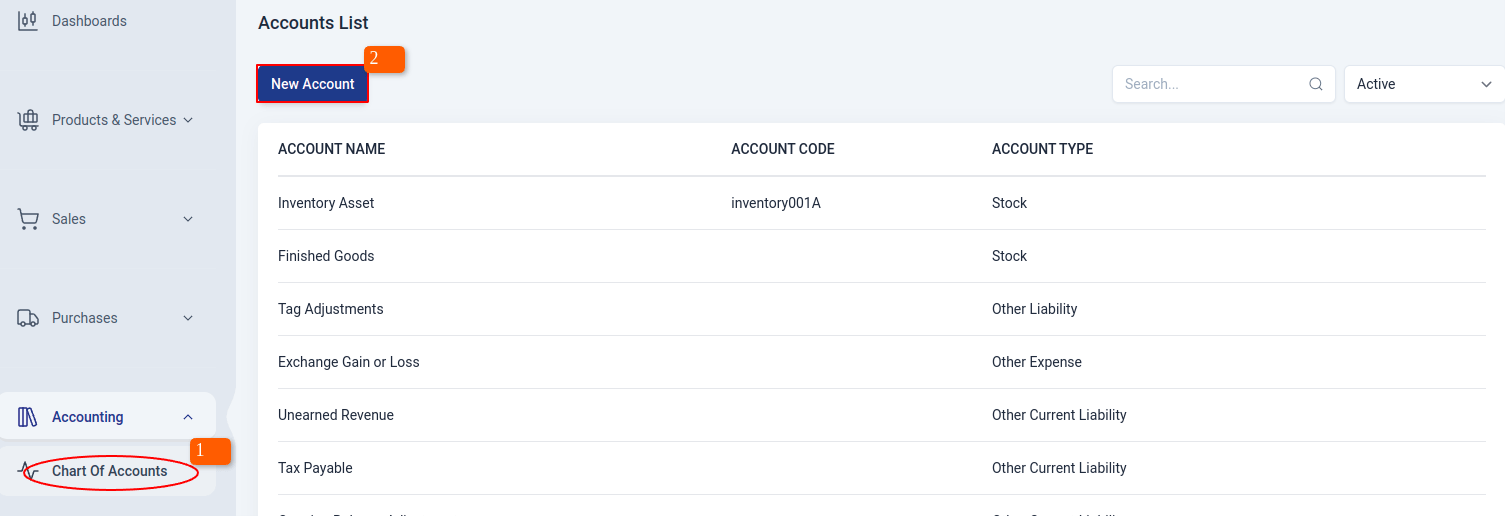
Navigate to Accounting module on the sidebar, and click on 'Chart of Accounts' section.
Click on 'New Account' button on the account list page.
Fill in the required details in the add account modal
To save the account as sub-account, check 'Make this a sub-account' checkbox and then select a parent account.
Once done click on the 'create' button.
Edit an account
To edit an account detail,
NOTE
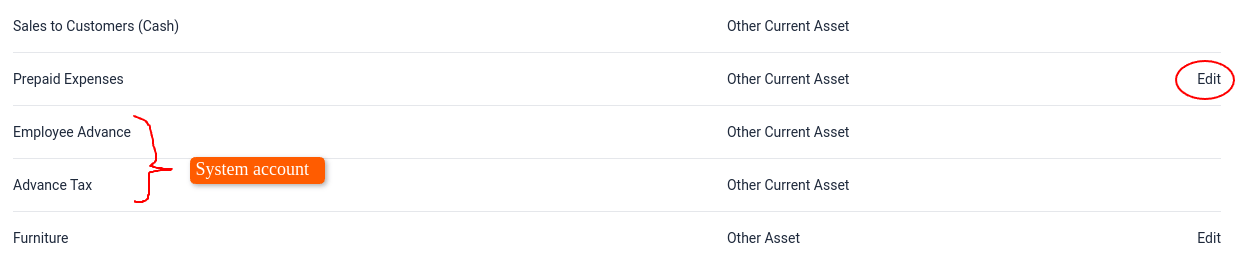
System accounts cannot be edited
Click on 'Edit' next to account type
Edit in the account details
Once done click on 'Update'