
Appearance
Business Overview Reports
Business Overview Reports provide a comprehensive summary of a company's key metrics and performance indicators.
Profit and Loss Report
Go to Reports > Business Overview > Profit and Loss

This report gives you a full overview of the profits and losses in your business over a specific time. It also summarizes your operating expenses.It contains different sections that include:
- Total Operating Income
Money received from all the sales transactions between your customers and the organization.
- Total Purchases Expense
This is the cumulative amount of money spent by a business on acquiring goods or services during a specific period.
- Total Operating Expense
These are the costs that your business has to pay. If you have chosen to track your spending with an expense account, it will be seen here when you record any of your costs.
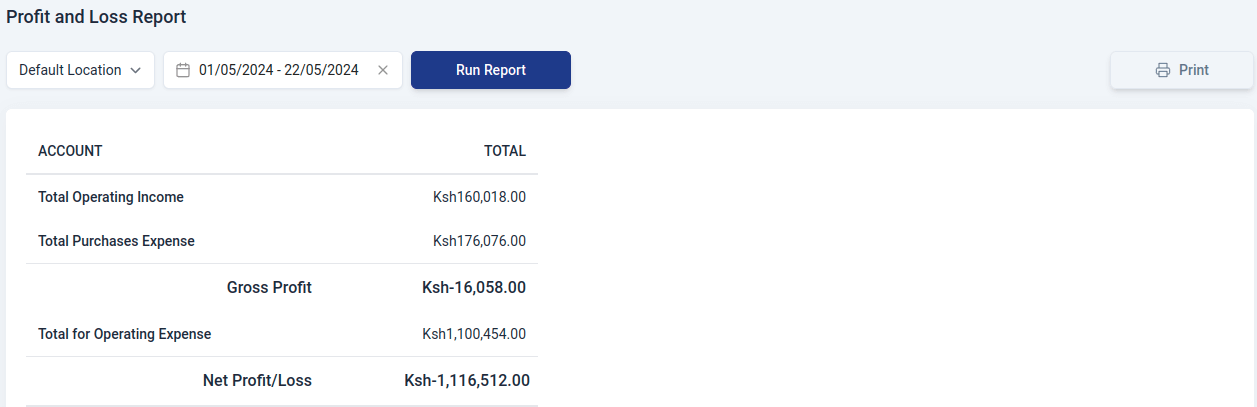
All the values are generated based on the location and time period that you’ve set.
Generating Report
To generate a customized report in the profit and loss section:
Select the report type to go to the report view page..
Choose the branch for the report.
Set the time period using the date picker and click 'Select.
Click 'Run Report' to generate it.
Use the print feature to print the report.