
Appearance
Item Groups
An item group is a collection of related items that are categorized together based on certain attributes or characteristics. This grouping helps in organizing and managing inventory more efficiently by allowing similar items to be handled as a single unit for certain operations such as pricing, discounts, and reporting.
Creating an Item Group
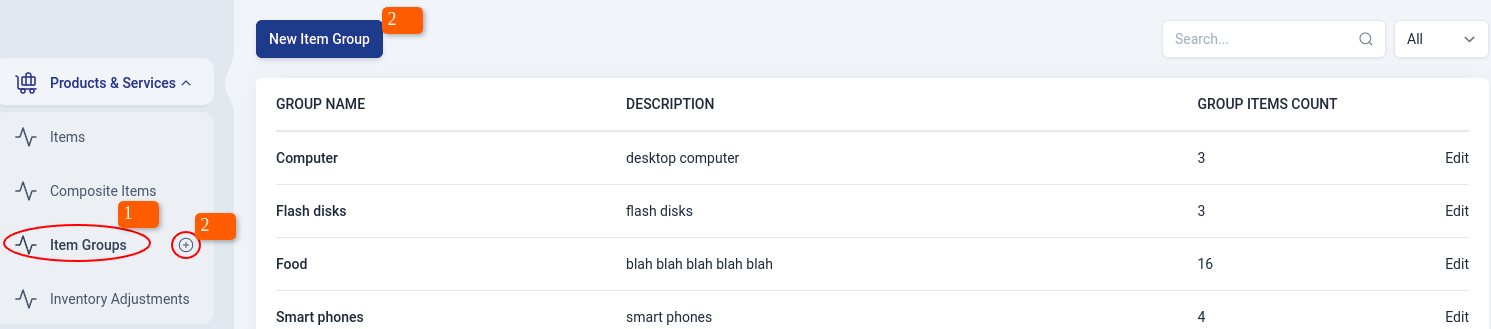
To create an item group,
Navigate to Products & Services module on the sidebar, and click on 'Item Groups' section.
Click on the 'New Item Group' button at the top-left of the list page. There's also a shortcut,click on the plus sign (+) next to items on the sidebar.
Alternatively, click on an Item Group on the list page,that will lead you to an overview page of the item, then click on the 'New' button.
Then, once you click on one of the above,the edit page will appear where you can add item group details. check item group information
To add the opening stock for item groups in different locations, check the 'Add Opening Stock' option.(This is optional) Learn more here
Click on 'save' to create the item or 'save & new' to create another item.
Item Group Information
Here,the user chooses the Item type,Sales tax,Unit of measure and fills in the Item Group name and Sales Description. If the Item Group is being tracked, then the user can choose between
- Tracking by serial numbers
- Tracking in batches
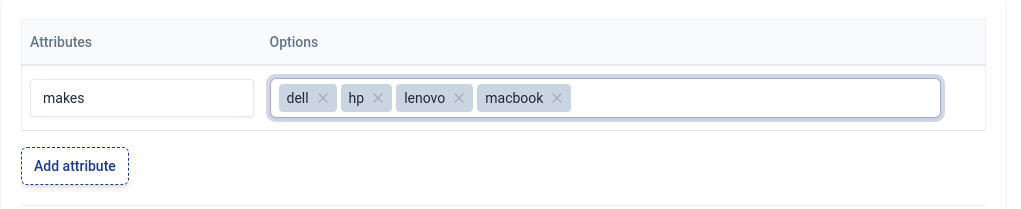
Adding Attributes and the Options
For example, let's say that a user has created an item group 'Laptops', the attribute can be type/make and the options can be hp,dell,lenovo and macbook as shown below.
Opening Stock Options
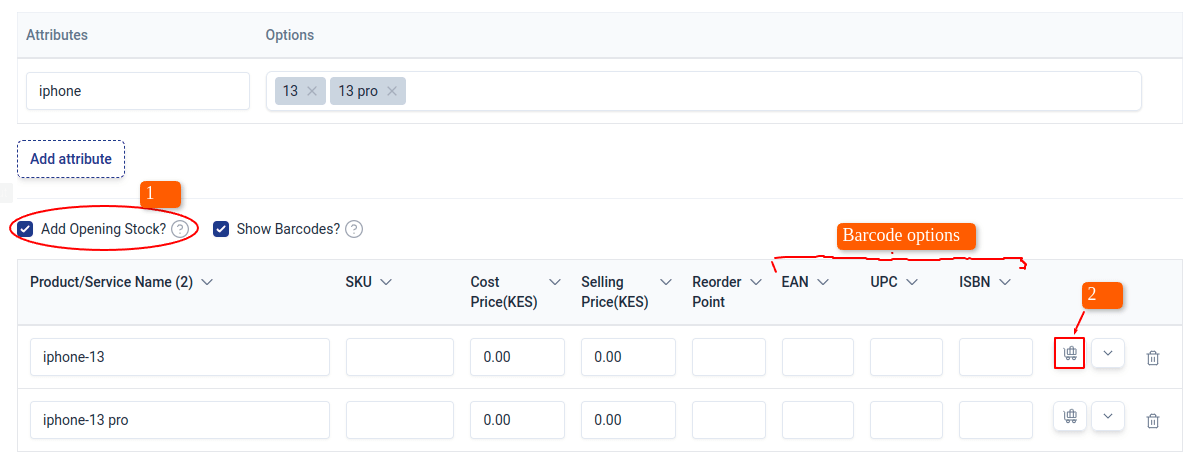
If 'Add Opening Stock' option is checked, you can add opening stock for item groups in different locations.
To add opening stock:
Check 'Add Opening Stock' checkbox.
Click on the cart icon to add opening stock for products in different business locations.
| Field Name | Description |
|---|---|
| SKU | The rate at which you buy the item from vendors. Your purchase transactions, such as bills and sales orders, will show this rate. |
| Cost Price | Price at which item group was bought from supplier. |
| Selling Price | Price at which item group is sold at to customers. |
| Reorder Point | Point at which item group should be re-ordered/re-stocked. |
| Opening Stock | Quantity of an item group at hand on the opening balance date. |
| Opening Stock Value | Cost at which you purchased the item for the opening stock. |
Show Barcodes Option
If this option is selected, it allows you to enter all details associated with the barcodes i.e EAN, UPC, ISBN.
Other Information
| Sales Account | Account used to track sales of an item. |
| Purchase Account | Account used to track purchase made for items in Upscale ERP. |
| Inventory Account | Account that monitors the stock of a particular item or product. |