Appearance
Payables Reports
Go to Reports module

Generating Report
To generate a customized report in the payable section:
Select the report type to go to the report view page..
Choose the branch for the report.
Set the time period using the date picker and click 'Select.
Click 'Run Report' to generate it.
Use the print feature to print the report.
The type of reports that can be generated in payables include:
Payable Summary Report
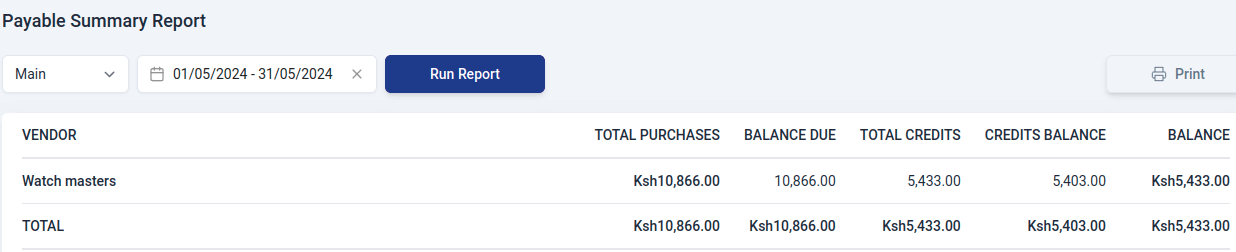
A Payable Summary Report is a document that shows all the money your business owes to vendors. It contains:
- Vendor
Name of the vendor.
- Total Purchases
The overall amount of money your business has spent on purchases from the specific vendor.
- Balance due
The remaining amount of money that your business needs to pay to the vendor. It is the total purchases minus any payments made.
- Total credits
The total value of any credits or adjustments received from the vendor.
- Credits Balance
The remaining value of credits that your business can apply to future purchases.
- Balance
The net amount your business owes after considering both the total purchases and any credits.
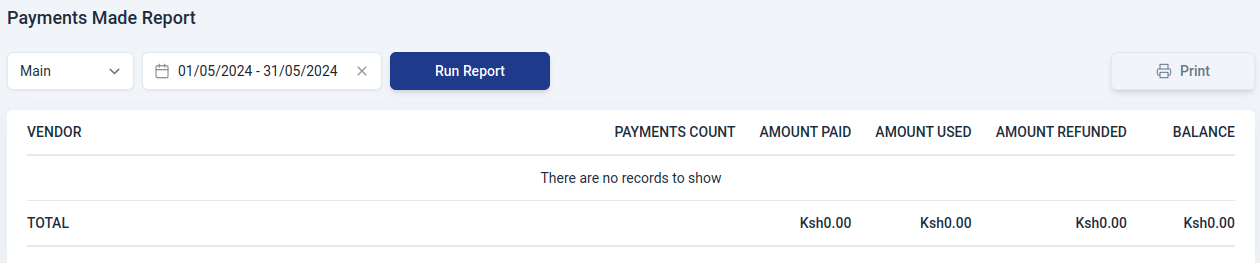
Payments Made Report
A Payments Made Report is a document that shows all the money your business has paid to vendors. This report includes details such as:
- Vendor
Name of the vendor.
- Payments count
The total number of payments your business made during a specific time period to the vendor.
- Amount paid
The total sum of money your business paid to a vendor.
- Amount used
The portion of the payments that has been applied or utilized.
- Amount refunded
The total sum of money refunded to your business by a vendor during the specified period.
- Balance
The outstanding amount yet to be utilized or returned.