Appearance
Purchases and Expenses Reports
Go to the Reports module

Generating Report
To generate a customized report in the purchase and expenses section:
Select the report type to go to the report view page..
Choose the branch for the report.
Set the time period using the date picker and click 'Select.
Click 'Run Report' to generate it.
Use the print feature to print the report.
The type of reports that can be generated in purchase and expenses include:
Purchases by Vendor
This is a document that shows all the stuff your business bought from different suppliers.It includes details such as:
- Vendor
Name of the vendor.
- Purchases Count
The total number of purchases made from a specific vendor during a specified period.
- Total Purchases
The total amount of money your business spent on purchases, exclusive of taxes.
- Total Purchases with tax
The total amount of money your business spent on purchases, inclusive of taxes.

Purchases by Item
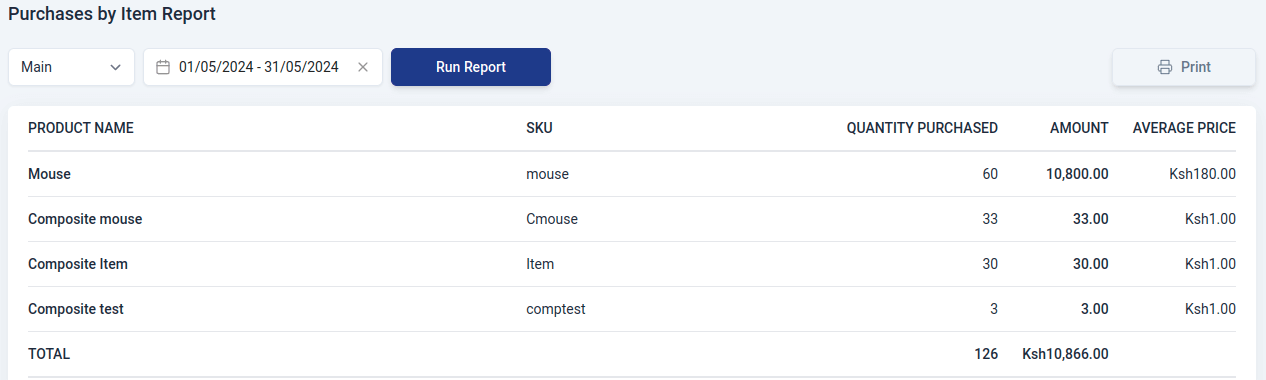
This is a report that shows what items your organization bought, how much of each item, and how much money was spent on each. It contains:
- Product name
Name of the item.
- SKU
Stock keeping unit of the item.
- Quantity purchased
The total number of units or quantity of each item that your business purchased.
- Amount
The total cost associated with purchasing each item. It reflects the overall expenditure on a particular product.
- Average price
The average cost per unit for a specific item.
Purchase Orders by Vendor
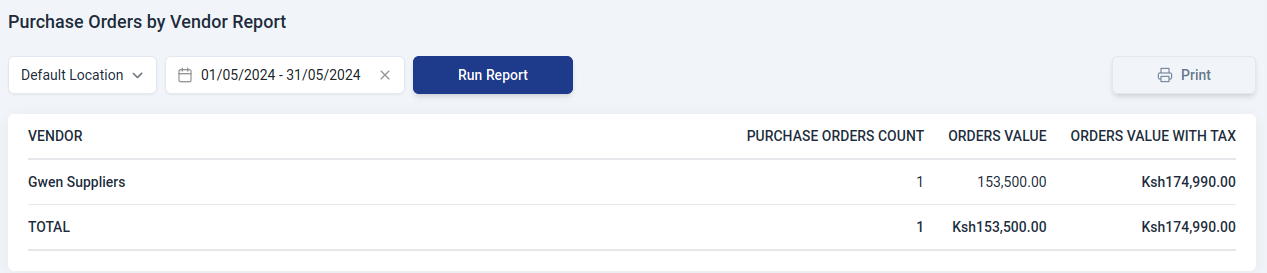
It is a document that shows all the orders your business placed with different suppliers.It include details such as:
- Vendor
Name of the vendor.
- Purchase orders count
The total number of separate purchase orders your business has issued to a specific vendor.
- Orders value
The overall amount of money associated with all the purchase orders sent to the specific vendor exclusive of taxes.
- Orders value with tax
The total amount of money associated with all the purchase orders sent to the specific vendor, inclusive of taxes.
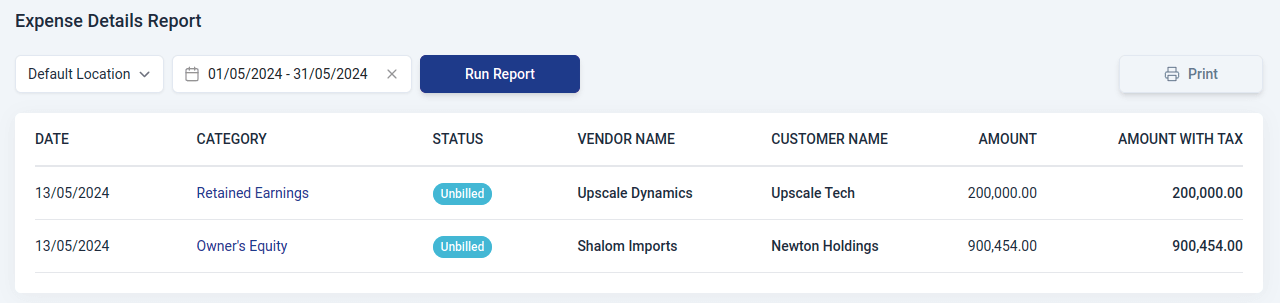
Expense Details
This is a document that shows a list that details all the money your business spent and what it was spent on.In Upscale ERP, an expense report contains:
- Date
The specific day on which the expense occurred.
- Category
The type or group to which the expense belongs.
- Status
Indicates the current state of the expense.
- Vendor Name
The name of the company or individual from whom the business made a purchase, and to whom the payment was made.
- Customer Name
The name of the customer or client associated with the expense.
- Amount
The total value of the expense exclusive of taxes.
- Amount with tax
The total value of the expense inclusive of taxes.