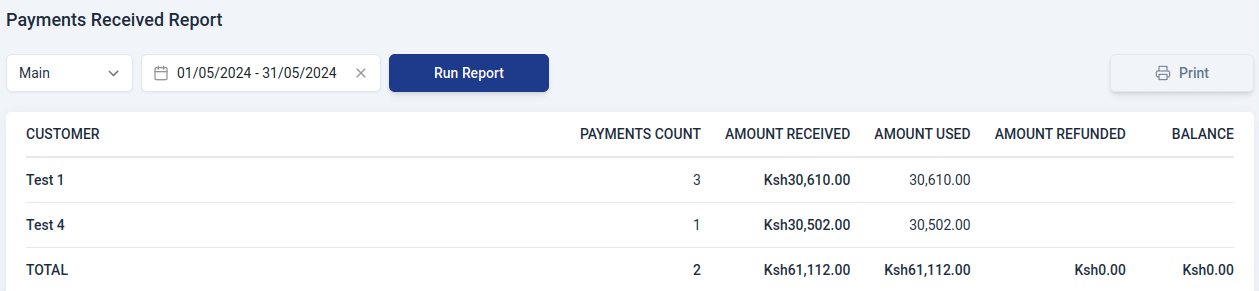
Appearance
Receivables Reports
Go to Reports module

Generating Report
To generate a customized report in the receivable section:
Select the report type to go to the report view page..
Choose the branch for the report.
Set the time period using the date picker and click 'Select.
Click 'Run Report' to generate it.
Use the print feature to print the report.
The type of reports that can be generated in receivables include:
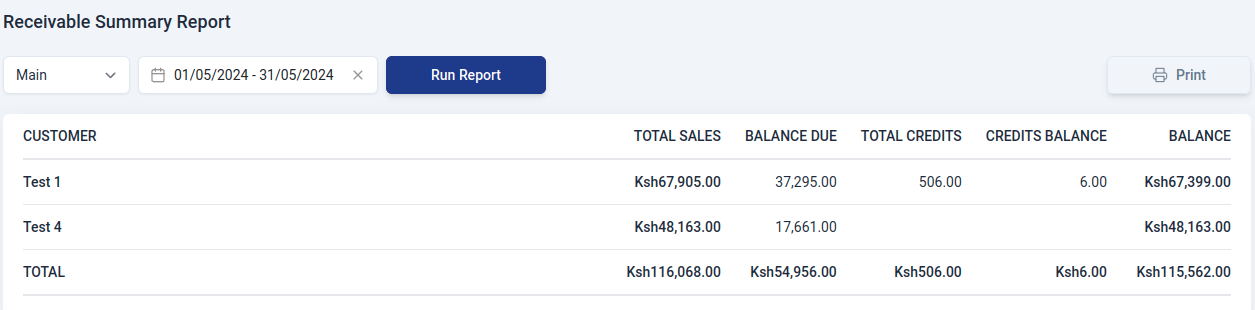
Receivable Summary Report
This is a report that provides a concise overview of outstanding amounts owed to a business. It includes:
- Customer
Name of the customer.
- Total Sales
The sum of all invoices generated for the customer.
- Balance Due
The outstanding amount that is yet to be paid by customers or clients.
- Total credits
The overall sum of credit transactions applied to an account.
- Credits Balance
The remaining credit amount available for a customer after considering all the credit transactions.
- Balance
The actual amount that the customer owes considering both charges and credits.
Payments Received Report
A Payments Received Report is a summary of detailed information about the payments received by an organization in relation to its inventory transactions. It contains:
- Customer
Name of the customer.
- Payments Count
The total amount of money received for a specific set of transactions or over a given time period.
- Amount received
The sum of money collected from customers.
- Amount used
The amount of money that has been applied or used out of total payments received.
- Amount refunded
The total sum of money refunded to customers during the specified period, due to returned goods, overpayments, or other reasons.
- Balance
The difference between the total amount received and the sum of amounts used and refunded.